Session state at a glance
Track active Claude and Codex sessions, current tasks, completion, and waiting states from one compact notch panel.
ZackEyes turns the MacBook notch into a live command center for Claude Code and Codex CLI: sessions, tasks, rate limits, and permission prompts stay visible without stealing focus.
Download: v0.10.3. New features shipped in v0.10.0 — see the roadmap.
Less terminal hunting.
More agent awareness.
Always in sight.
When the agent starts, stalls, asks, finishes, or hits a limit, the signal appears where your eyes already are: the top edge of the screen.
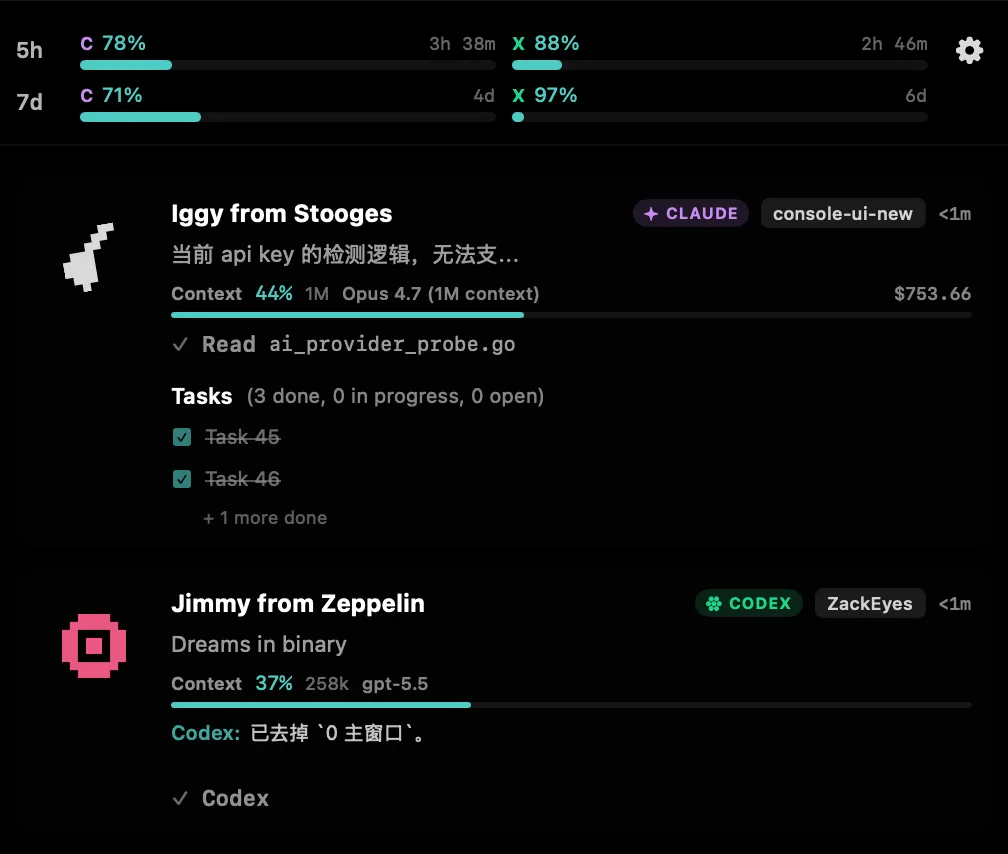
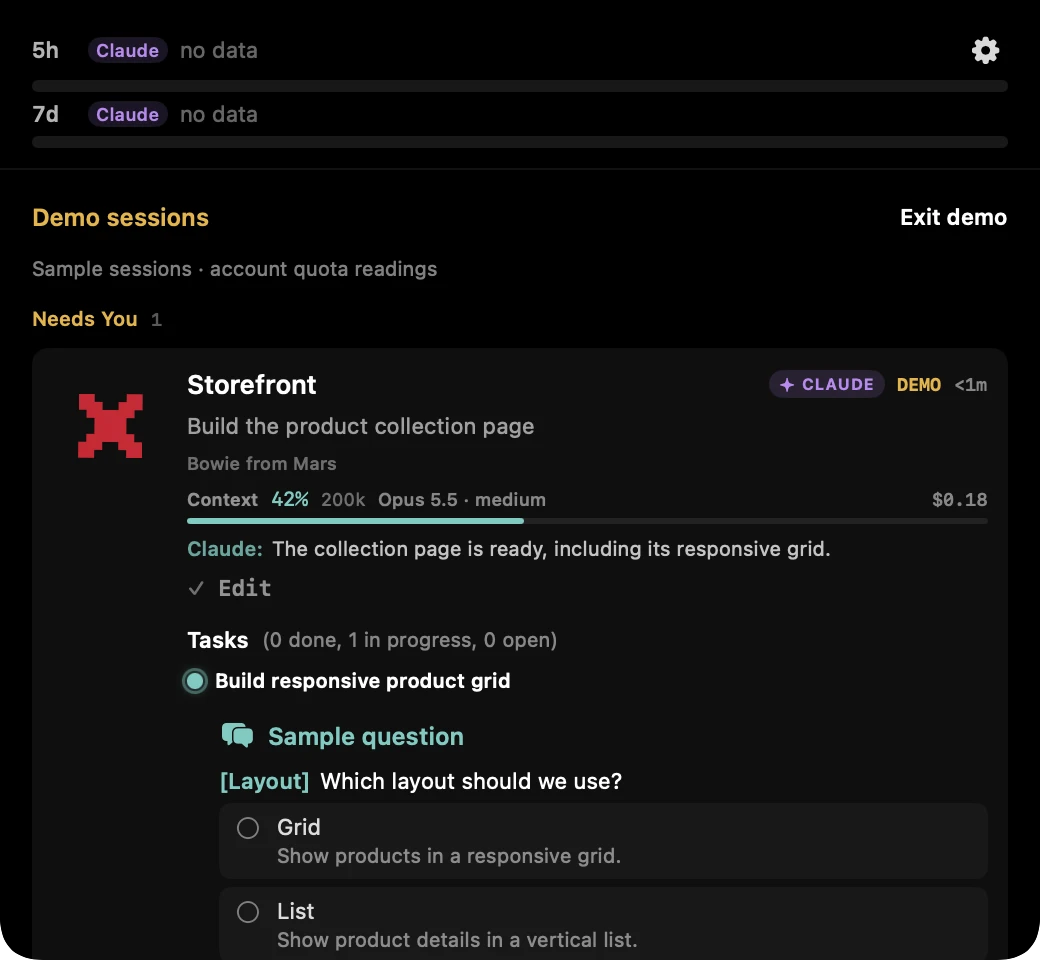
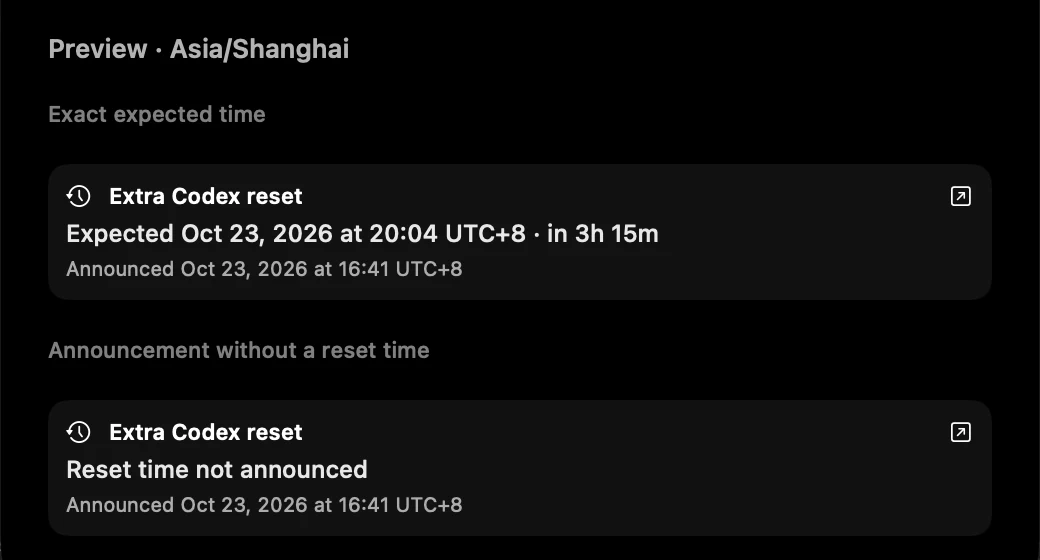
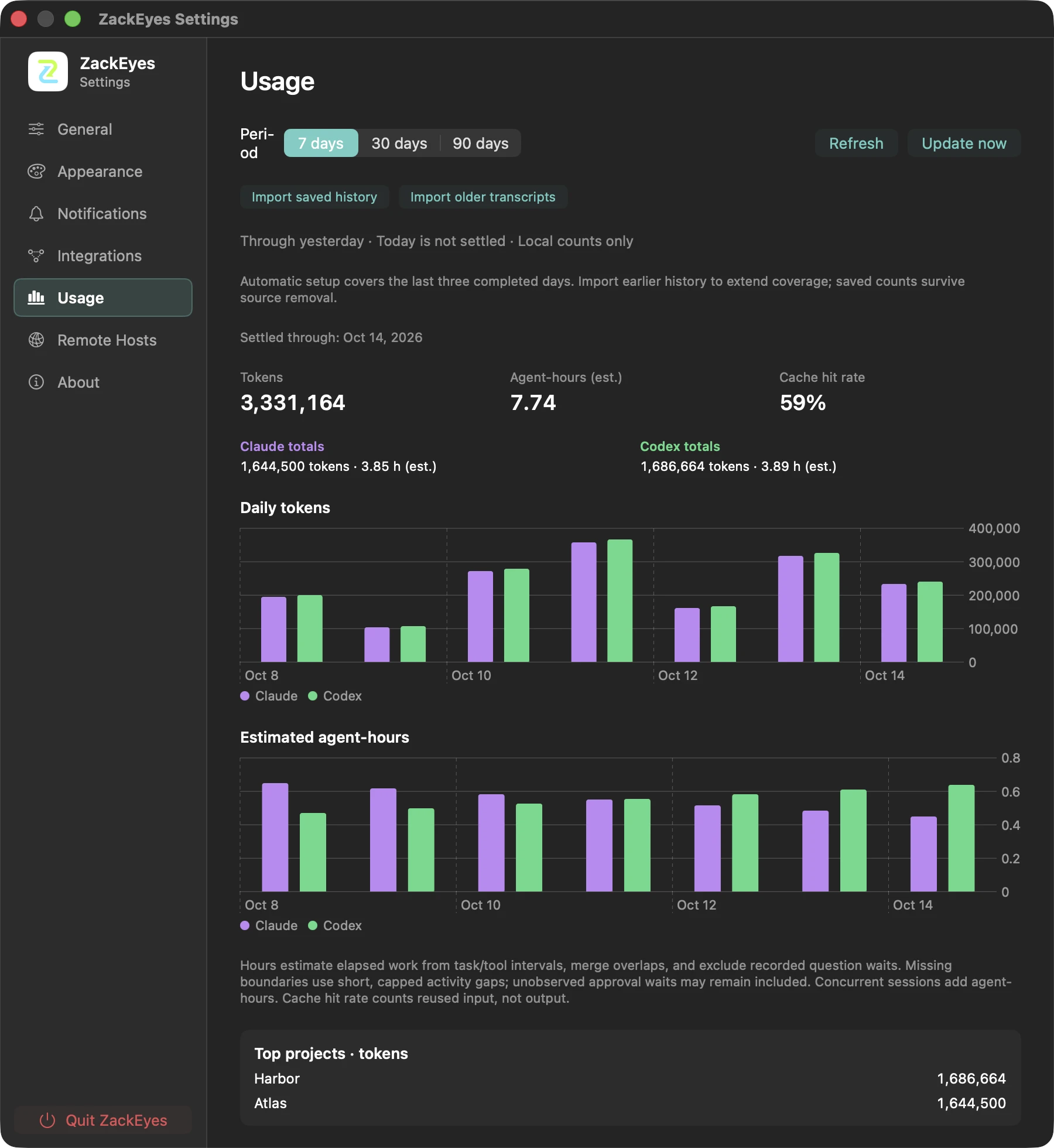
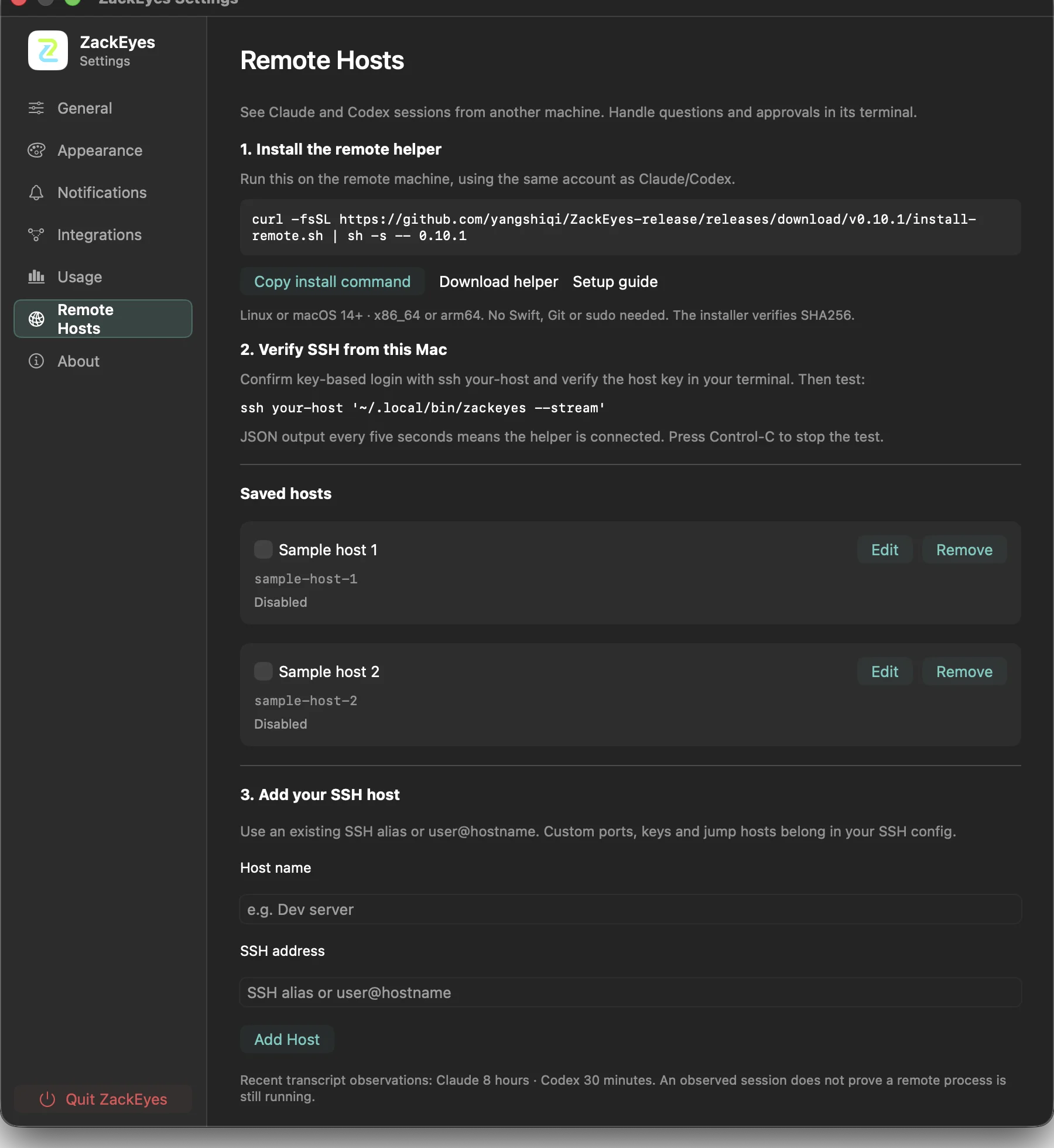
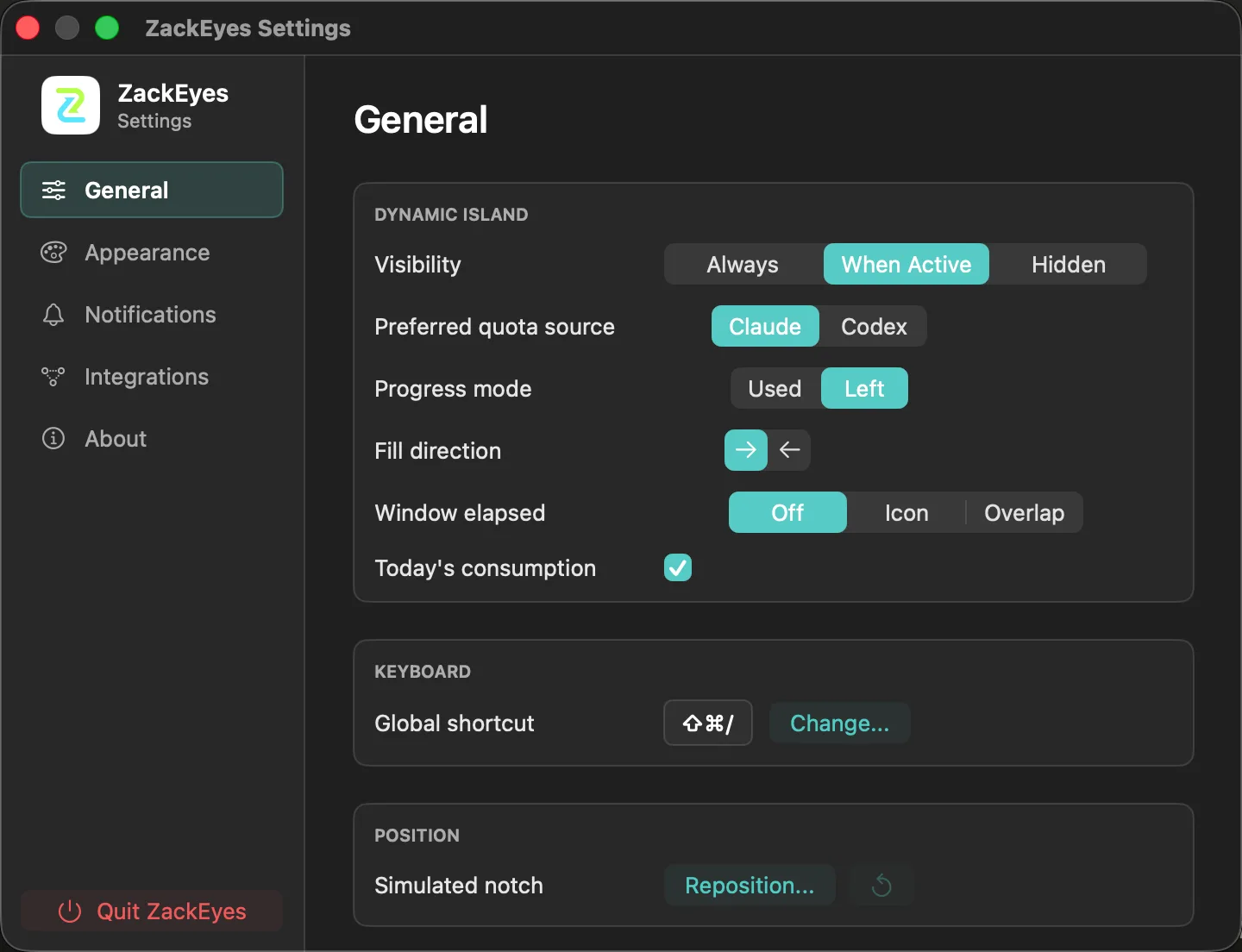
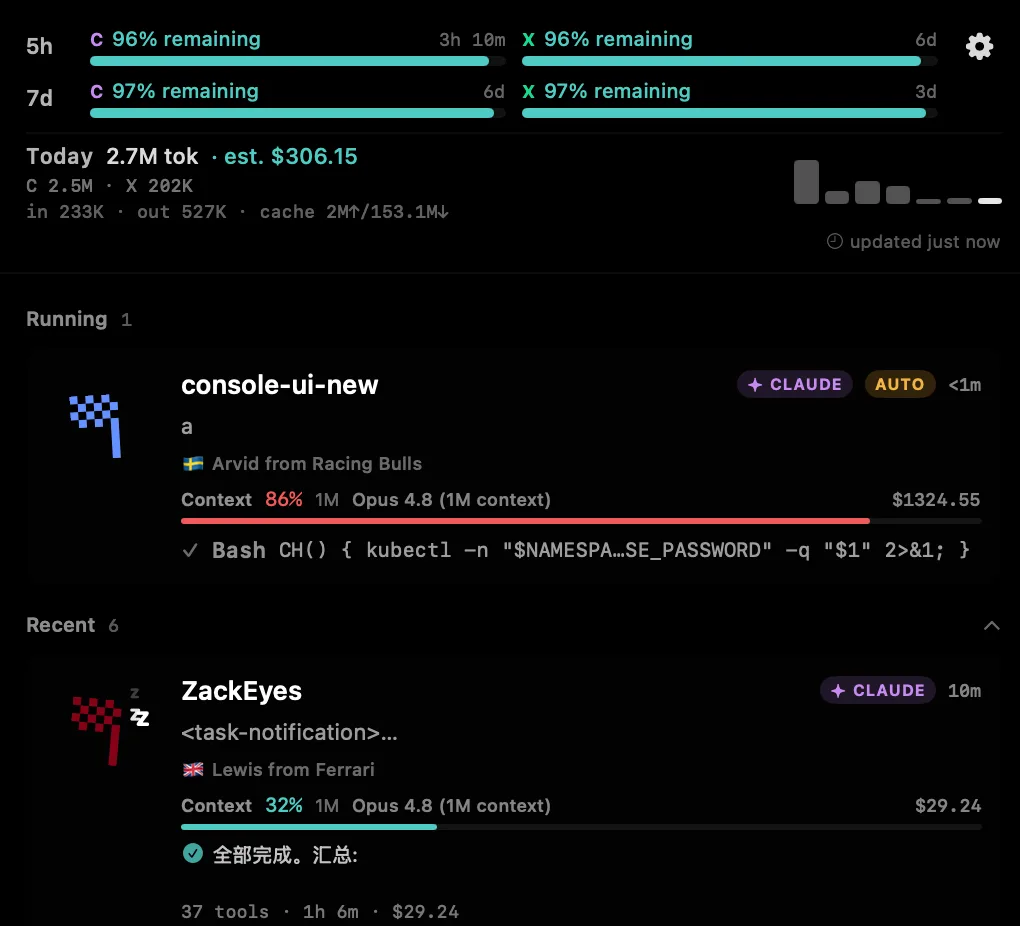
Actual ZackEyes interfaces: local Usage archives, SSH host setup, supported question choices and session states. Gallery captures use isolated sample data or the built-in Demo. The current download is v0.10.3. Codex extra reset notices are included since v0.10.2. Read how public reset notices work, or select an image to view it at full size.
ZackEyes is not another chat surface. It is a small operating layer for the moments when autonomous tools need your attention, but your editor should stay in front.
Track active Claude and Codex sessions, current tasks, completion, and waiting states from one compact notch panel.
Approve or deny sensitive tool calls from the panel. Supported Claude AskUserQuestion choices can be answered after opt-in; unsupported or expired questions return to the terminal.
See 5-hour and 7-day usage pressure when available, with per-agent stale-reading markers and last-updated hints.
Choose Rock Legends, F1 2026, AI Moguls, or Crayon Shin-chan themes with matching buddy names and custom notification sounds.
Use the physical notch when it exists, switch to a simulated Dynamic Island-style panel when it does not, and keep the same agent signals visible across desktop setups.
Tune the product around attention moments: pending approvals, task completion, stalled work, and useful usage pressure.
Click a session card to bring forward the matching iTerm2, Terminal.app, Ghostty, Warp, WezTerm, Kitty, Alacritty, VS Code, or Cursor tab. When nothing matches, the card says why instead of doing nothing.
See per-session context window pressure, model and cost metadata, and rate-limit tracks when the agent exposes them.
Use a custom global hotkey, hide or show the island, choose the compact agent display, and install updates through in-app DMG download.
A live Today row tracks tokens and estimated USD cost. Settings → Usage adds 7/30/90-day token and agent-hour archives through yesterday. Model pricing is bundled for offline use and refreshed online from GitHub — no API key, no cloud calculation.
Open ports, git branch, uncommitted file count, what a dispatched Claude subagent is working on, and whether the agent is compacting its context rather than stalling. Ports come from kernel syscalls, not lsof.
See a public extra reset announcement while Codex is active, including its post time and an expected time when one was given. Each exact time uses your Mac's time zone; your account limits remain separate.
The bridge speaks through Unix sockets, keeps agent hooks quiet when the app is closed, and leaves your terminal workflow intact.
ZackEyes is local-first by default. Read the privacy notes for what the website and app do outside your Mac.
$ claude code
hook SessionStart -> /tmp/zackeyes.sock
hook PreToolUse -> task visible in notch
ask PermissionRequest -> approve from panel
hook Stop -> notify when complete

$ codex
jsonl task_started -> live fallback
jsonl task_complete -> done
ZackEyes is MIT-licensed. Every hook installer, socket message, and notch animation lives in the open. Audit it, fork it, ship a competing notch — just don't break Claude Code.
Clear answers for installation, compatibility, privacy, and where product feedback should go.
ZackEyes requires macOS 14 (Sonoma) or newer. The public DMG contains a universal build for Apple Silicon and Intel Macs.
Yes. ZackEyes is designed as a companion for Claude Code and Codex CLI sessions, showing agent state, permission moments, task progress, and usage pressure near the MacBook notch.
ZackEyes processes local status on your Mac and does not upload prompts or replies for hosted analysis. It fetches update metadata and pricing from GitHub. While a local Codex session is active, it can fetch public extra reset announcements without sending account or session data. Optional SSH hosts send session metadata to your Mac; local Usage archives store counts and timing metadata, not conversation text.
Use the ZackEyes release repository Issues page for bugs, install problems, compatibility reports, and product requests. Include your ZackEyes version, macOS version, agent CLI, and reproduction steps.
Yes. ZackEyes includes a simulated Dynamic Island-style panel for Macs without a physical notch, so desktop Macs and older MacBooks can still use the same agent awareness workflow.
The simulated island anchors to the primary display, including an external display configured as primary. If positioning differs on your setup, report the display arrangement and macOS version.
Yes. ZackEyes supports Rock Legends, F1 2026, AI Moguls, and Crayon Shin-chan themes, each with matching buddy names and notification sound choices.
ZackEyes can jump to the right terminal tab in iTerm2, Terminal.app, Ghostty, Warp, WezTerm, Kitty, Alacritty, VS Code, and Cursor when Accessibility permission is granted.
Hooks let ZackEyes receive local agent lifecycle, permission, task, and completion events without turning into a hosted dashboard. ZackEyes-managed hook commands include the string zackeyes so they can be identified later.
The bridge is designed to fail quietly and return control to the terminal workflow. Claude Code and Codex CLI should continue using their native behavior when ZackEyes is not available.
Download ZackEyes 0.10.3 for macOS, or use GitHub Issues for problems and feature requests.