
The Swift package target is `macOS(.v14)`, so Sonoma or newer is the supported baseline.
Setup guide
Install ZackEyes.
ZackEyes ships as a universal macOS DMG for Apple Silicon and Intel Macs. The current app target requires macOS 14 or newer.
Install.
Use the public release channel for the latest installer asset and future update checks.
- Download the DMG. Use the latest ZackEyes installer from GitHub Releases.
- Open the DMG. Drag ZackEyes into Applications when Finder shows the installer window.
- Launch the app. Keep Claude Code or Codex CLI running in your normal terminal; ZackEyes installs the supported hooks when it can find those CLIs.
- Handle macOS security prompts. If macOS asks for confirmation on first launch, approve the app from System Settings and reopen it.
- Review optional permissions. Accessibility permission enables terminal tab jump. Notifications permission enables macOS alerts for completed turns, rate limits, update availability, and errors.
Compatibility
What is supported.
The release build uses both `arm64` and `x86_64`, producing a universal macOS app bundle for the DMG.
ZackEyes installs hooks for whichever CLI it finds and skips missing agents without breaking the terminal workflow.
With Accessibility permission, clicking a session card can activate the terminal tab where that agent is running.
A Settings window — opened from the notch gear or the menu-bar icon — collects the global hotkey, island visibility, quota presentation, and a Preferred quota source that picks whether the compact pill favors Claude or Codex.
Model compatibility.
v0.9.7 adds the following model and protocol support. The current download is v0.10.3.
- Codex GPT-6.1 Sol and GPT-6 Astra. Observed reasoning effort appears beside the model. Request-aware estimates account for reported service tiers and eligible long requests; concurrent tool, interruption, subagent and compaction events preserve the correct turn. PR #252.
- Claude Fable 5/5.1, Opus 5/5.5 and Sonnet 5/5.5. Cards follow model changes and display observed effort. Daily estimates distinguish actual fast responses and 5-minute/1-hour cache writes. Failed tools and API failures receive separate handling; child completion does not notify parent completion. PR #258.
- Metadata availability. Effort is shown only after the CLI supplies it; no model default or global configuration is inferred. A local Claude Code 2.1.295 probe supplied effort on Stop, after the reply. Startup recovery can restore the model without restoring effort.
- Cost estimates. Daily totals use API list prices, not subscription invoices. Codex costs may be incomplete when request metadata or pre-attachment history is missing. Claude session-card cost uses the CLI-reported total. Unknown model pricing remains unpriced.
- Codex hooks. The current flag is
hooks;codex_hooksis deprecated. ZackEyes does not read or modify~/.codex/config.toml. These changes observe existing CLI sessions and do not add native steering or a second agent runtime.
Public Codex extra resets.
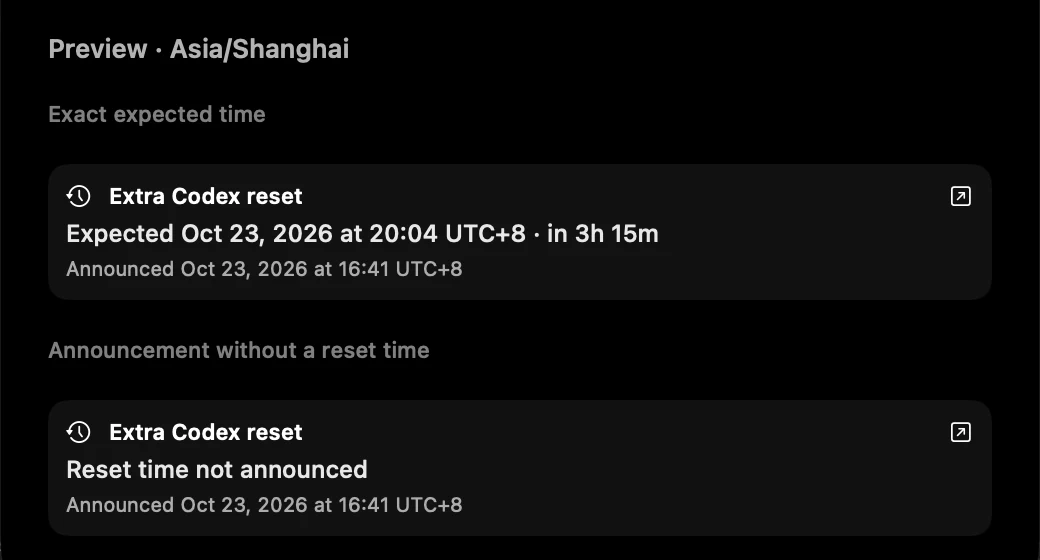
Available since v0.10.2. See PR #288. While a local Codex session is active, ZackEyes can check a public CodexReset announcement feed for extra resets. The public announcement is separate from your account's 5-hour and 7-day limits; check Codex /usage to confirm your own balance.
The notice keeps reset timing beside the title and shows when the announcement was posted. The original announcement occupies two lines; hover over it to read the complete text. If an exact reset time was published, it also shows that time and a countdown. Both times use this Mac's time zone and include the UTC offset, such as UTC+8. When the source gives only a day or no reset time, ZackEyes does not invent a clock time. The icon at the right of the title opens the original post.
A fresh local account reading can retire an older notice after the client observes quota recover to at least 95% remaining, by at least 10 percentage points before its original reset deadline. This depends on a reset plan the client previously observed; a public announcement alone does not confirm recovery. Settings → Notifications has separate switches for Codex extra reset announcements and system notifications. Both start enabled; fetching runs only while a local Codex session is active. The screenshot uses simulated announcements and does not show an account-specific reset.
Build from source.
ZackEyes is MIT-licensed and the full app, bridge CLI, and this website live in one monorepo. If you'd rather build the DMG yourself, audit the hook installer, or hack on a feature, clone the repo and run the same Makefile we ship from.
- Clone the source.
git clone https://github.com/yangshiqi/ZackEyes.git - Need Xcode Command Line Tools.
xcode-select --installif you haven't already; the build uses Swift 6 from the system toolchain. - Build the app.
cd ZackEyes && make appproduces a debug bundle.make app-releasebuilds the universal release bundle.make dmgwraps it into a drag-to-Applications DMG. - Run the tests.
swift testexercises the bridge, hook installer, socket types, remote observation and notch logic. - Contribute. Pick a good first issue, open a PR. See the repo README for the workflow.
Features added in v0.10.0.
Since v0.10.0, ZackEyes includes opt-in supported Claude question answers, SSH remote observation, demo sessions, local usage history and stale quota hints. These features are included in the published v0.10.3 download. See the roadmap for future work.
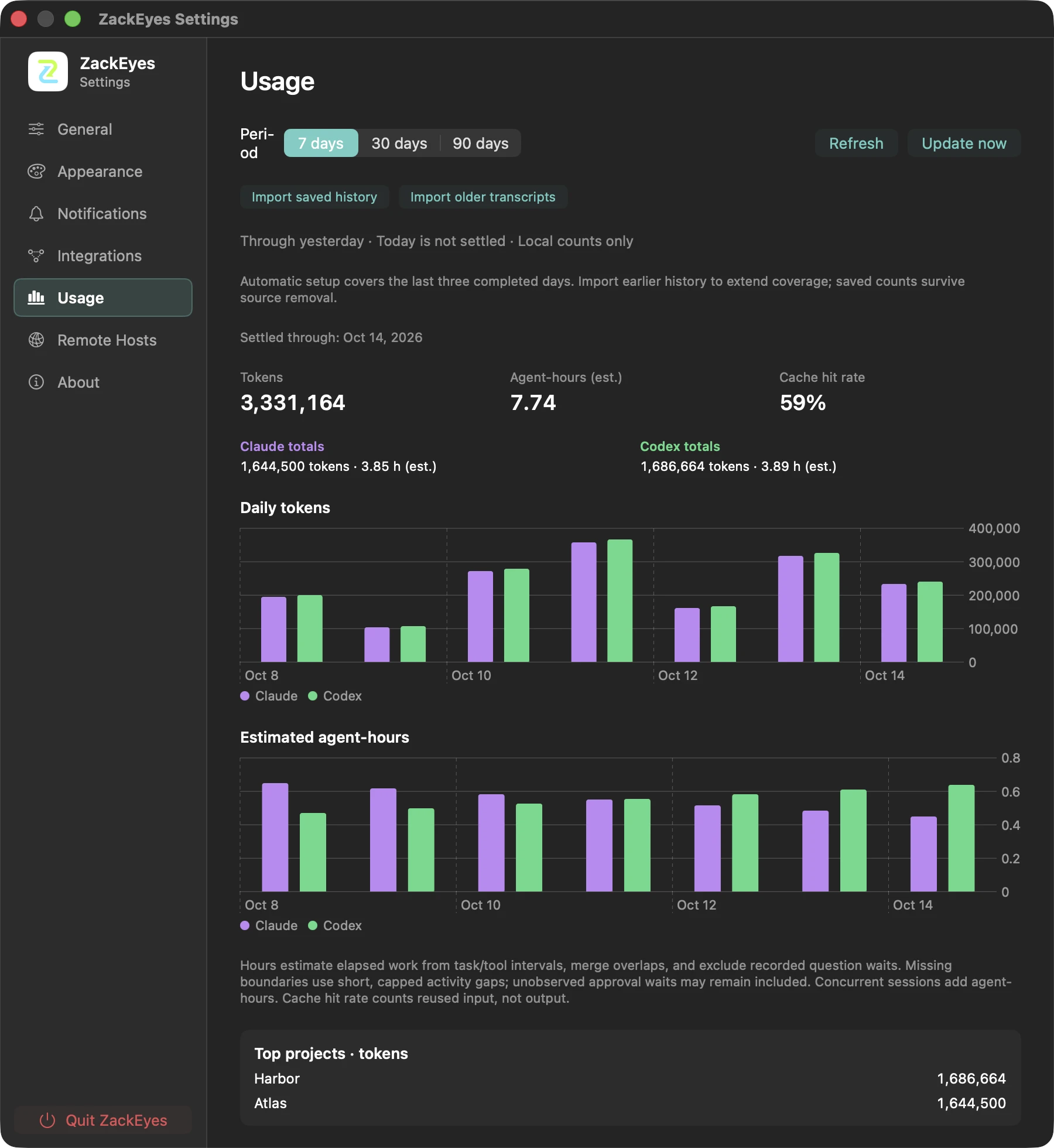
Settings → Usage shows complete local days through yesterday. Hover a daily chart for its full date and per-agent values. Daily archives settle after 03:00 with startup catch-up; changing periods or refreshing reads the saved archives. Use Import saved history or Import older transcripts for earlier data, with Pause and Resume across restarts. Today/quota readings remain separate. Skipped source observations can leave estimates incomplete.
Answer supported Claude questions.
Enable Settings → Notifications → Answer questions from the notch (off by default). Select the supported choices and press Submit. Unanswered questions fall back to the terminal after two minutes; unsupported questions and remote requests remain in their terminal. Tool permission approvals and question answers are separate actions.
Explore Demo mode.
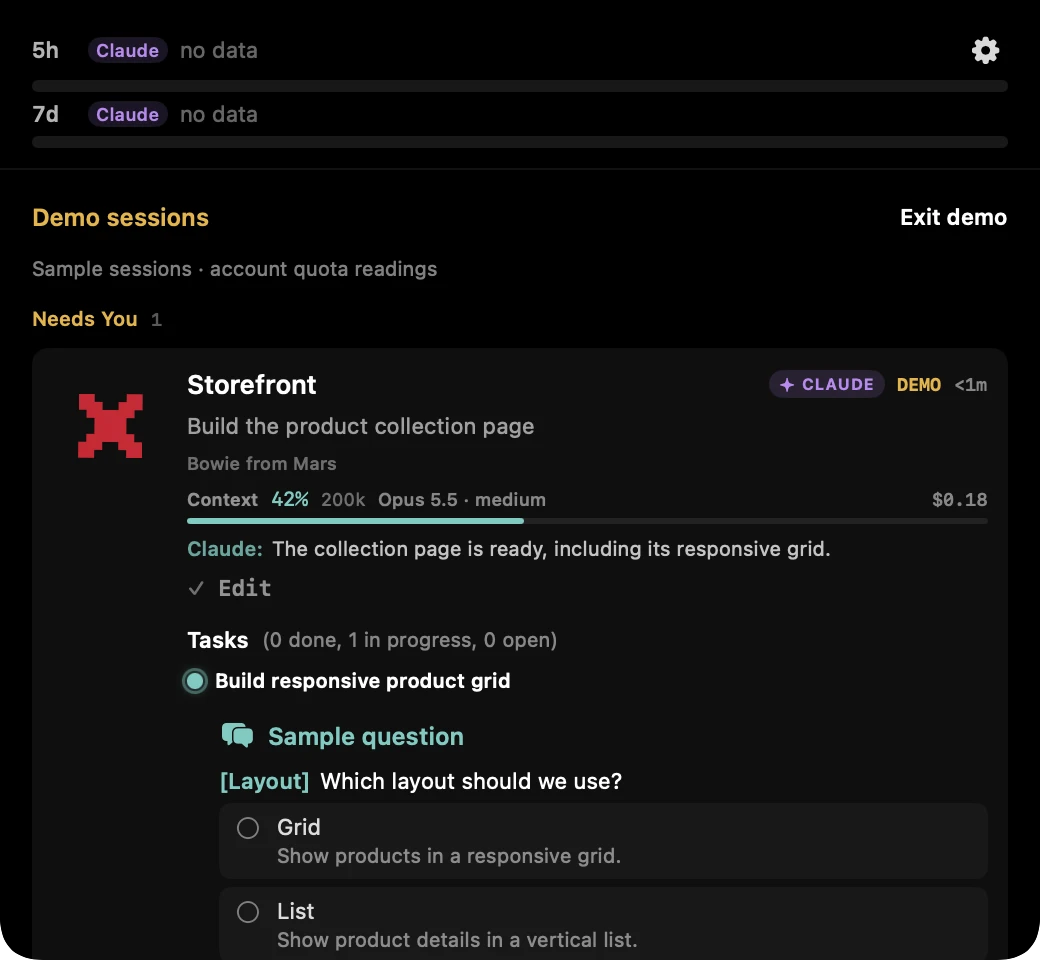
Choose Demo mode from the menu-bar or notch gear menu. Synthetic Claude/Codex sessions cycle through working, waiting and idle states; sample approvals and questions are interactive. Exit demo returns to live sessions. Real questions, approvals or errors also return to the live view. DEMO badges identify sample cards; quota bars continue to use account readings and can show no data.
Read and extend Usage history.
The Today row is live token/cost information; Settings → Usage is a separate archive of completed days, not a historical billing report. Include cached reads is enabled by default; changing it updates totals, daily charts and rankings. Hover over a token-chart day to see its combined Total. The selection is saved and does not change cache hit rates or estimated activity time. Automatic setup covers the last three completed days. Import older transcripts extends available history; Import saved history migrates the old ledger without changing it. Pause and Resume preserve committed progress across restarts. Parallel sessions add agent-hours, so a day may exceed 24 estimated hours. Deleted source history cannot be reconstructed, and invalid/oversized observations may leave estimates incomplete.
Daily work journal is still under development for v0.11.0. Its public generation menu is hidden; setup, publishing and scheduling are unfinished and excluded from the v0.10.0 release.
Install the version-matched remote helper on your Linux or macOS host, under the same account that runs Claude/Codex. No Swift or Git installation is required. The installer selects x86_64 or arm64, verifies SHA256 and installs to ~/.local/bin/zackeyes. Linux packages are fully static and omit debug/symbol tables; macOS requires 14 or later.
curl -fsSL https://github.com/yangshiqi/ZackEyes-release/releases/download/v0.10.3/install-remote.sh | sh -s -- 0.10.3
Connect and troubleshoot SSH hosts.
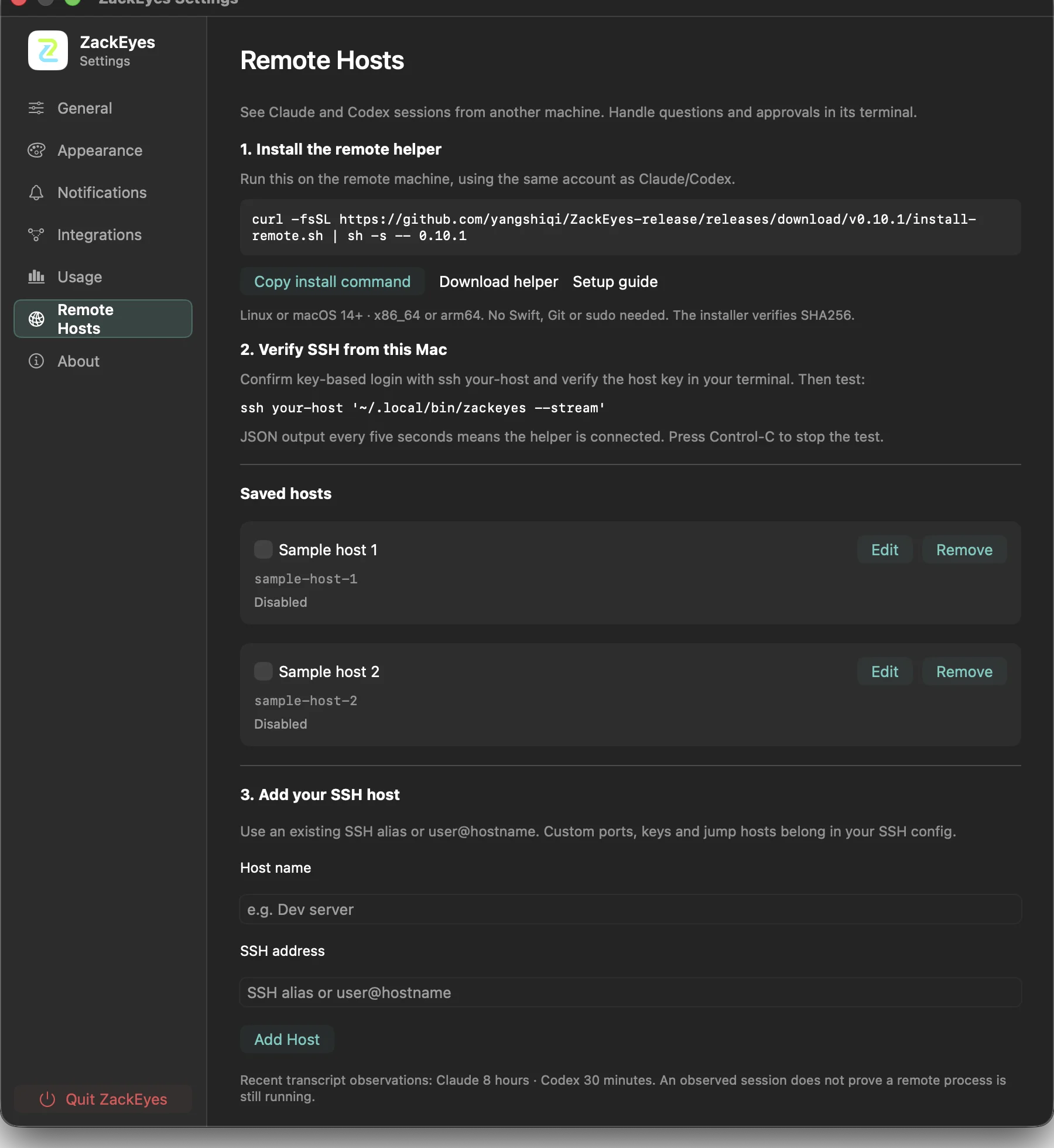
In Settings → Remote Hosts, follow Install the remote helper → Verify SSH from this Mac → Add your SSH host. Copy install command copies the version-matched command; Download helper opens the matching release, and Setup guide opens these instructions. Add a name and existing SSH alias or user@hostname. Configure custom ports, identity files or jump hosts in your own SSH configuration. ZackEyes does not edit it. Before enabling the host, verify ssh your-host in a terminal, then verify ssh your-host '~/.local/bin/zackeyes --stream'. Run the installer above on that host first. Remote approvals and questions remain in the remote terminal.
Authentication or host-key errors must be resolved in the terminal; ZackEyes does not show password prompts or accept unknown host keys. A missing helper requires installing the stream binary; an unsupported stream requires updating the helper. Connection status appears beside each host. Remote cards use the same avatar, title, agent/risk badges, model/effort and tool presentation as local cards, with a host and observed-state label. YOLO/AUTO badges require observed policy metadata from the refreshed helper; older helpers still connect but cannot provide these fields. These are metadata observations, not proof of a running process, with no local approval or terminal-jump actions.
Uninstall ZackEyes.
Remove the agent integrations while the app is still installed, then quit and delete the app. Keep local data if you want to preserve Usage history for a reinstall.
- Uninstall integrations. Open Settings → Integrations → Uninstall Integrations… and complete the removal before deleting the app. This removes ZackEyes-managed agent entries.
- Quit and remove ZackEyes. Quit from its menu and delete the app from Applications.
- Retain or delete local data. Removing
~/.zackeyesdeletes settings, saved Usage history, SSH host configuration and any existing local journal files. Copy that directory first if you want to retain them; a reinstall cannot reconstruct deleted history after its source transcripts are gone.
Troubleshooting
Common setup problems.
macOS says ZackEyes cannot be opened
The app is ad-hoc signed and not notarized. Use the verified official download and follow the first-launch command in the Install section or the installer README, then open it again from Applications.
Claude or Codex sessions do not appear
Confirm the relevant CLI is installed and start a fresh Claude Code or Codex CLI session. Codex threads that started before hooks were installed may need a new thread for full hook-driven behavior.
Permission requests do not show in the notch
Check that ZackEyes is running and that the agent hook file contains a ZackEyes-managed command. If the app is closed, the agent should fall back to its native terminal prompt.
Reinstall hooks
Open Settings → Integrations and choose Repair Hooks, then start a fresh agent session. The repair backs up hook files and preserves unrelated settings.